Affiliate Ad Spy
Affiliate Ad Spy for ClickBank & Digistore24 — beyond the creative
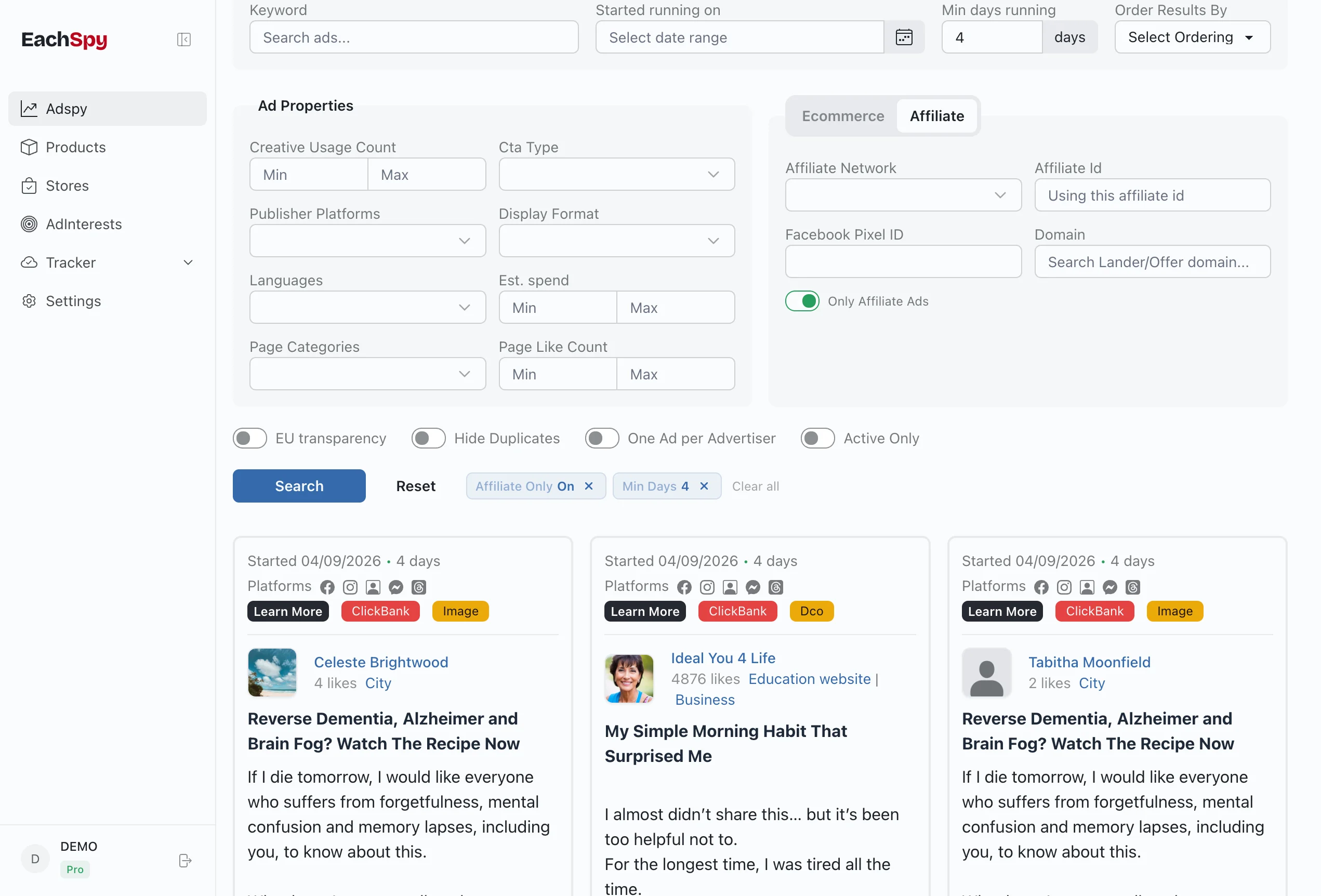
A good creative is only half the story. Eachspy follows detected Facebook and Instagram ads through to their landing pages and offers, revealing the affiliate network, offer domain, affiliate ID, tracking pixels, creative reuse, and estimated spend along the way.
118K+
affiliate ads in the database
82K
BuyGoods ads
+1.1K this week +21%
19K
ClickBank ads
+1.2K this week -17%
12K
Digistore24 ads
+814 this week -35%
3.2K
GiddyUp ads
+156 this week -39%
New ads detected in the last 7 days, with change vs the prior week. Updated daily.
Click any ad to inspect
Every data point exposed in one panel
Click any ad in the search results to open the detail panel. The Affiliate tab shows the network, affiliate ID, offer domain, vendor IDs, and Facebook pixel — all extracted automatically from the landing page and redirect chain.
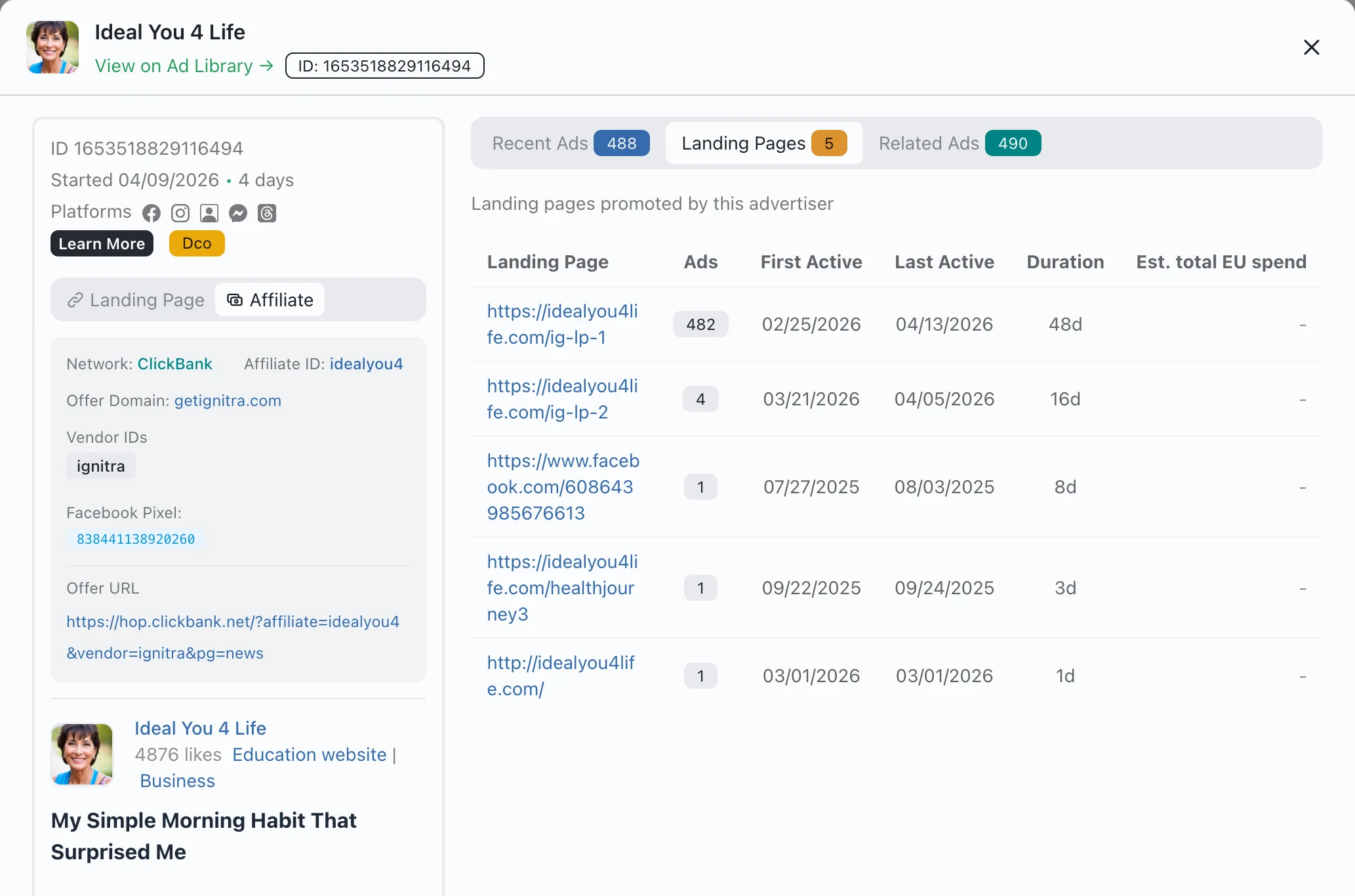
Landing Pages tab shows every URL this advertiser promotes, with ad counts and duration
Recent Ads tab lists all campaigns from the same page, sortable by date
Related Ads tab finds campaigns sharing the same creative or landing page
Live From The Ad Library
One live affiliate ad, decoded
This campaign is running right now. The creative is the half everyone sees — beside it is what Eachspy extracted from its landing page and redirect chain. Open the detail panel on any affiliate ad to see the same fields.

JSE Inc - Alabama Vehicle Title Services
3649 likes · Business
Affiliate
ClickBank
3b82c4w2oabzesb3x7gdlbk-5o
www.boat-alert.com
Tracking
Landing page
http://www.jseal.com/
ClickBank workflow
How to use Eachspy as a ClickBank spy tool
Start with the network instead of a broad keyword. This keeps the results focused on detected ClickBank funnels, then lets campaign duration, spend signals, and landing-page reuse narrow the offers worth studying.
-
01
Filter ClickBank ads
Select ClickBank in the affiliate network filter to remove unrelated ecommerce campaigns.
-
02
Find sustained campaigns
Sort by duration or estimated spend to surface offers affiliates continue promoting.
-
03
Inspect the full funnel
Compare the offer domain, affiliate ID, pixels, landing page, and creative variants before testing your own angle.
Every affiliate ad includes these signals
Eachspy extracts these fields automatically from each affiliate campaign in the database. Use them to filter, compare, and research.
Campaign identity
- Affiliate network (ClickBank, Digistore, WarriorPlus, …)
- Affiliate ID from the tracking URL
- Offer name and offer domain
- Niche classification
Tracking & pixels
- Facebook pixel IDs
- TikTok pixel IDs
- Google Ads and GTM container IDs
- Vendor IDs from the affiliate network
Ad performance
- Running duration and start date
- Estimated EU spend from transparency data
- Landing page URL and total ads per page
- Creative reuse count across campaigns
How affiliate marketers use this
Discover which offers affiliates are scaling
Filter by network or niche, sort by duration or spend, and find offers that multiple affiliates keep promoting — a signal that the offer converts.
Reverse-engineer landing pages and creatives
Open the detail panel to see the full funnel: bridge page, offer URL, CTA, and creative format. Compare variants across the same offer domain.
Find every ad sharing a Facebook pixel
Search by pixel ID to reveal all campaigns using the same tracking. Useful for spotting affiliates who run multiple offers under one pixel.
Frequently Asked Questions
Common questions about affiliate ad research with Eachspy.
It depends on your networks and budget. Eachspy lets you search and preview affiliate ads for free, including detected network, offer domain, landing page, and creative signals. Unlimited filters, exports, and advertiser tracking require a paid plan.
ClickBank, Digistore24, WarriorPlus, JVZoo, and MaxWeb are detected by name. Beyond named networks, Eachspy also flags ads by offer domain patterns, tracking parameters, and redirect chain structure.
Yes. Filter the ad database by network to see every ClickBank, Digistore24, WarriorPlus, JVZoo, or MaxWeb ad we've detected — each with its affiliate ID, offer domain, landing page, and estimated spend. Sort by duration to find the offers affiliates keep scaling.
The regular ad spy covers all ecommerce ads. The affiliate view narrows to ads promoting affiliate offers and adds the detected network, affiliate ID, offer domain, and tracking pixels — signals that help you judge how widely an offer is being tested, although they cannot prove profitability.
Yes. Enter a pixel ID in the affiliate filter panel to find every ad that uses it. This reveals which campaigns share tracking infrastructure.
Eachspy estimates spend from EU transparency data: total reach multiplied by a typical CPM. It is directional, not exact — useful for gauging which campaigns are being scaled.
Filter by ClickBank in the network dropdown and sort by ad duration or spend. Offers with multiple affiliates running long campaigns are strong conversion signals — study their landing pages and angles before building your own funnel.
You can search and preview affiliate ads for free. Full dashboard access — unlimited filters, network and pixel search, exports, and advertiser tracking — is included on the paid plans.
Related workflows
Start researching affiliate campaigns
Open the dashboard, toggle the affiliate filter, and search by network, offer domain, pixel, or keyword.