Facebook & Instagram Ad Spy
Facebook & Instagram Ad Spy for ecommerce stores
Search millions of Facebook and Instagram ads by product keyword, advertiser, or landing-page domain. Filter by publisher platform, ad duration, estimated spend, creative format, and ecommerce platform to understand which competitor campaigns are still gaining traction.
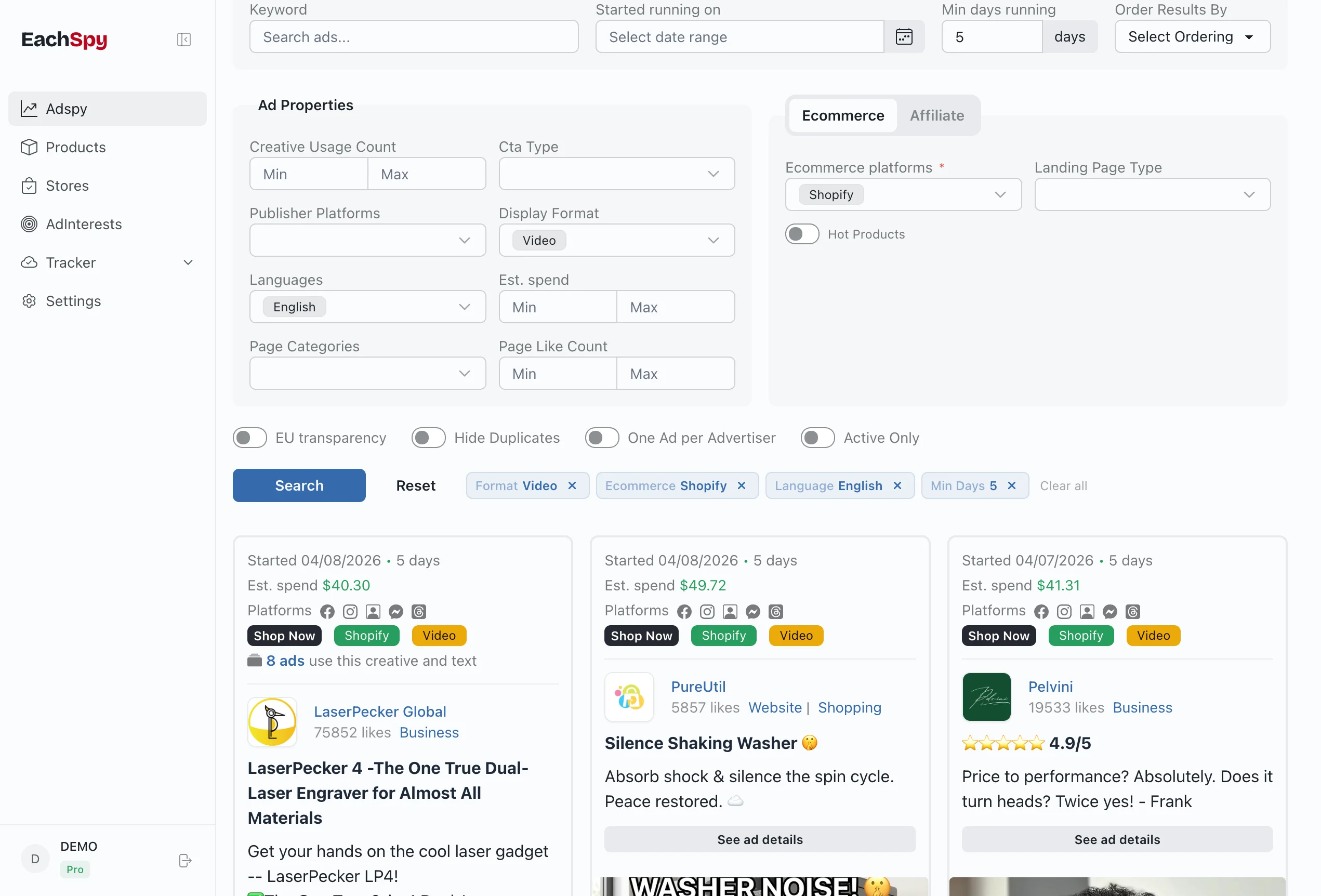
59M+
Facebook and Instagram ecommerce ads in the database
15M
Shopify ads
1.2M
Shopline ads
858K
Shoplazza ads
670K
WooCommerce ads
Competitor lookup
Search the Facebook Ad Library by domain
Start with a competitor's website when you do not know the Facebook Page behind it. Enter the store or offer domain in Eachspy to find ads whose landing pages point to that site, then open the matching advertisers and campaign history.
01
Enter the domain
Use the store, brand, or offer website as your search.
02
Find connected ads
Match landing-page URLs to advertisers and their campaigns.
03
Inspect the history
Compare active and past creatives, duration, and spend signals.
One domain connects the campaign
Landing-page domain
competitor.com
Advertisers
Pages using it
Campaigns
Active and past ads
Creatives, landing pages, duration, and estimated EU spend
One campaign, with its platform context preserved
Creative signals
Format, CTA, language, and reused variants
Campaign signals
First seen, days running, active status, and spend estimates
Destination signals
Landing-page domain, ecommerce platform, and related ads
Instagram coverage
Use Eachspy as an Instagram Ad Spy
Facebook and Instagram campaigns often share the same advertiser, creative, and destination. Filter by publisher platform to focus on ads delivered on Instagram without losing the wider campaign context that explains how long the creative has run and where it sends traffic.
- Focus the results on ads delivered through Instagram
- Compare the same creative across Facebook and Instagram
- Follow each ad to its landing page and related campaigns
Official source + research layer
A Facebook Ad Library alternative for deeper research
Meta Ad Library remains the official source for ads currently running across Meta products. Eachspy adds an indexed ecommerce research layer when you want to start from a website domain, compare landing pages, or sort campaigns by public research signals.
For primary transparency data, use Meta's official Ad Library.
See the competitor-ad workflow| Meta Ad Library | Eachspy | |
|---|---|---|
| Primary job | Official ad transparency | Competitor and ecommerce research |
| Start with | Keyword or advertiser | Keyword, advertiser, or landing-page domain |
| Campaign context | Ads currently active for general commercial searches | Indexed active and past records, duration, and related creatives |
| Destination context | The destination shown on an individual ad | Landing-page groups, domains, related ads, and detected platforms |
| Scale signal | Official fields available for that ad | Estimated EU spend when transparency reach is available |
Neither interface gives you a competitor's complete targeting setup, revenue, conversion rate, actual budget, or ROAS.
Click any ad to inspect
Full campaign history in one panel
Click any ad to open the detail panel. See the advertiser profile, landing page URL, platform badges, and campaign timeline — then switch tabs to explore the full history.
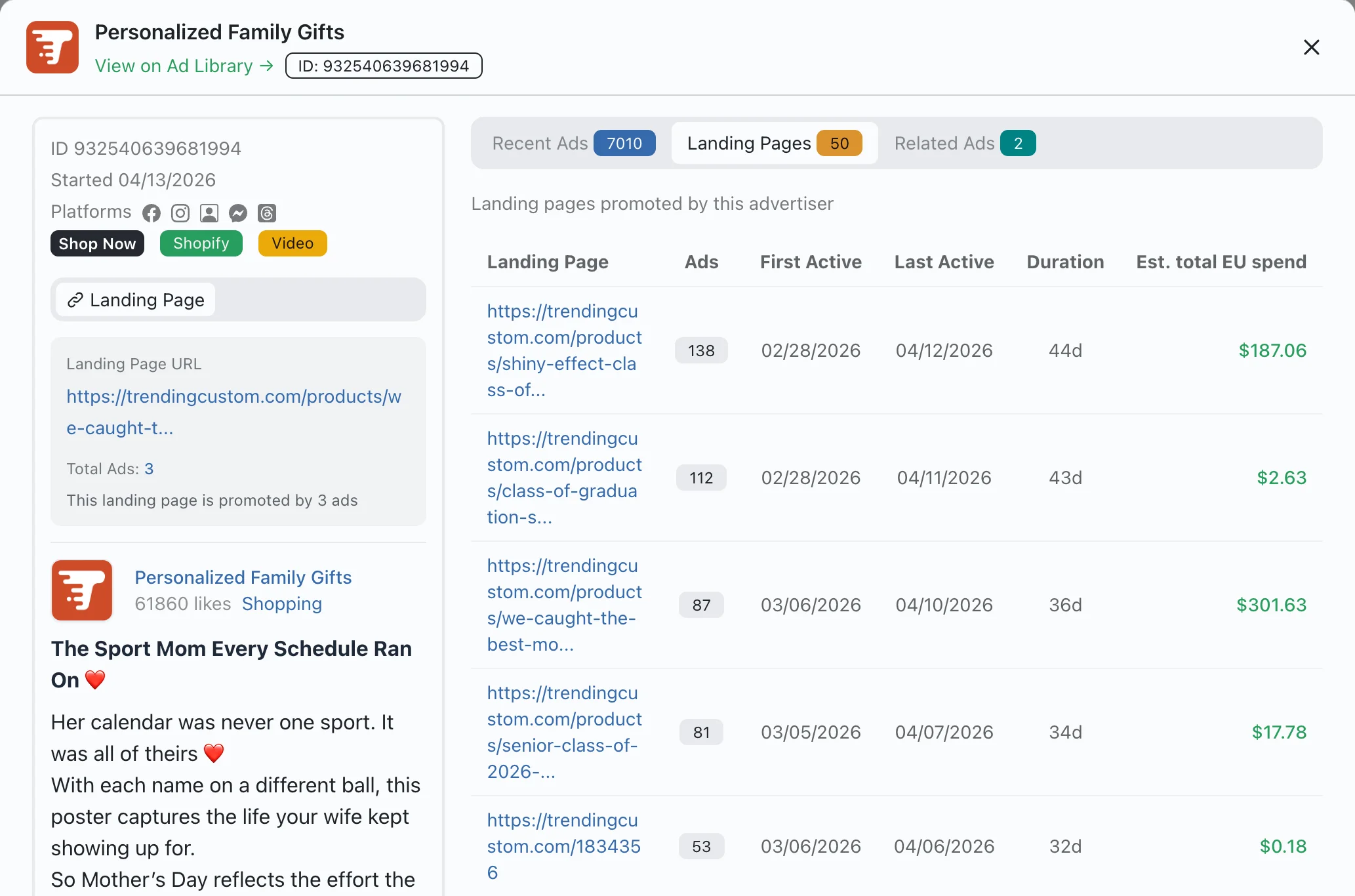
Landing Pages tab shows every product URL with ad count, duration, and EU spend
Recent Ads tab tracks all campaigns from the same advertiser over time
Related Ads tab finds campaigns sharing the same creative or landing page
How to find winning ads
-
1
Search by product keyword, advertiser page, or landing-page domain.
-
2
Filter by publisher platform, ecommerce platform, ad format, duration, and spend.
-
3
Open the detail panel to inspect landing pages, creative history, and related campaigns.
-
4
Save promising advertisers to your tracker to monitor their new launches.
Signals available in every ad
Frequently Asked Questions
Common questions about Facebook ad research with Eachspy.
Long-running ads, repeated creative variants, and reused landing pages are strong signals that an advertiser is continuing to invest in an angle. They justify closer research but do not prove sales or profitability.
Enter a competitor's Facebook page name or domain in the search bar. Eachspy returns matching indexed campaign records with duration, available spend estimates, and landing pages so you can study the patterns they keep using.
Yes. Enter the domain in the main search field. Eachspy matches it against indexed landing-page URLs and returns the advertisers and Facebook or Instagram campaigns that send traffic to that website.
Yes. Eachspy indexes ads delivered on Instagram alongside Facebook. Use the publisher platform filter to focus on Instagram campaigns, then compare their creatives, duration, landing pages, and available spend signals.
Eachspy is an alternative research interface for indexed ecommerce ads, not a replacement for Meta's official transparency source. It adds landing-page domain search, campaign history, related creatives, ecommerce filters, and estimated EU spend when available. Neither source reveals a competitor's revenue, conversion rate, or true ROAS.
Yes. Use the platform filter to show only ads linking to Shopify stores. Sort by ad duration or estimated spend to surface products that dropshippers are actively scaling.
Eachspy indexes millions of Facebook and Instagram ads, with new ads added daily. The database covers ads from Shopify, WooCommerce, Shopline, Shoplazza, and other ecommerce platforms.
Yes. The best use is pattern research: study hooks, offer structures, formats, and landing page flows, then create your own original campaign.
Related workflows
See research workflowsAdvertiser Tracker
Track any Facebook advertiser and monitor their ads over time. See total ads, active campaigns, new launches, landing pages, and estimated spend.
Shopify Product Research
Use Shopify product research software to filter products by keyword, price, publish date, and linked ads. Compare stores, dropshipping signals, and creatives.
Ready to research with live data?
Open the dashboard to search the full Eachspy database with advanced filters and saved workflows.