Spy on Facebook ads from ChatGPT, Claude or Codex
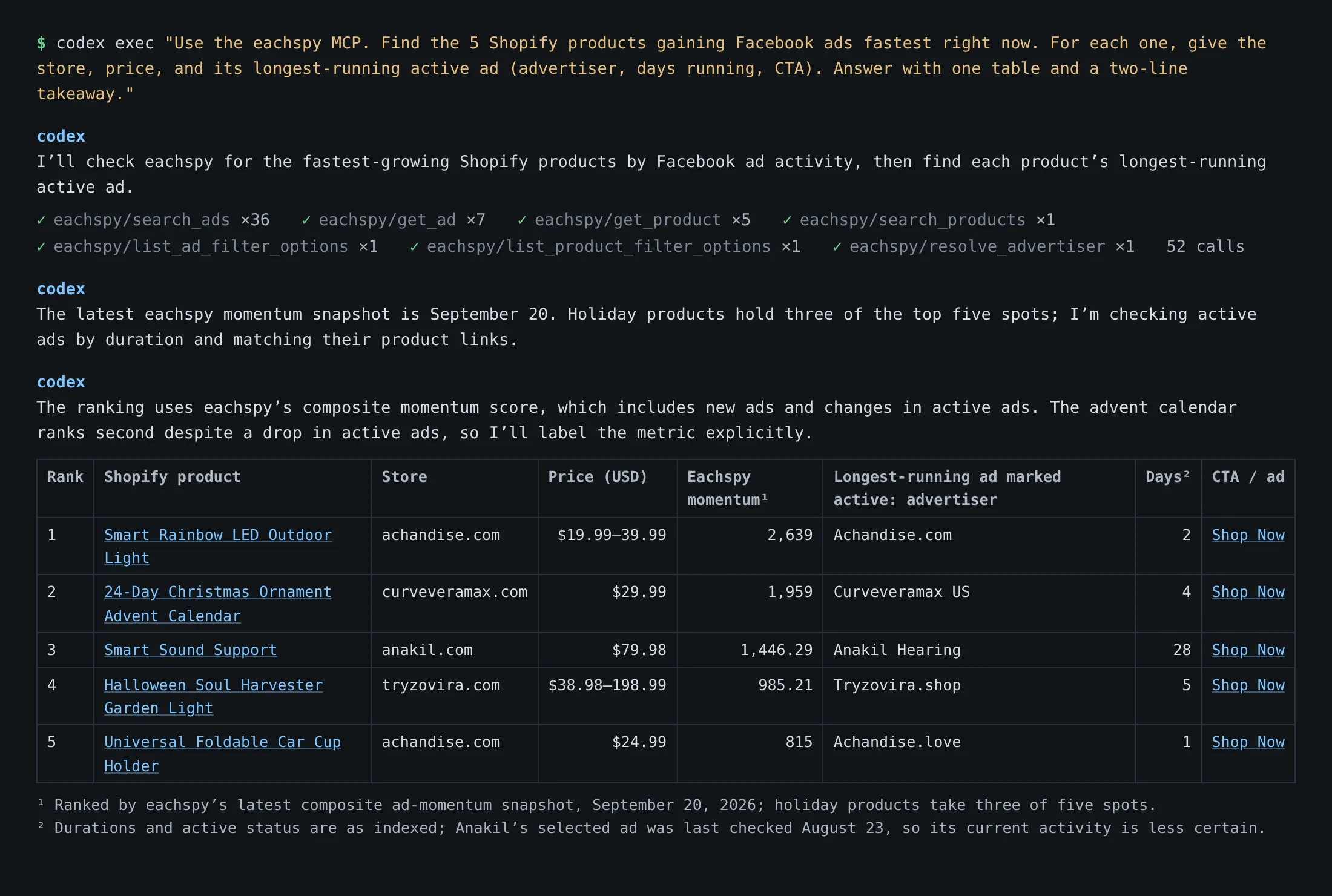
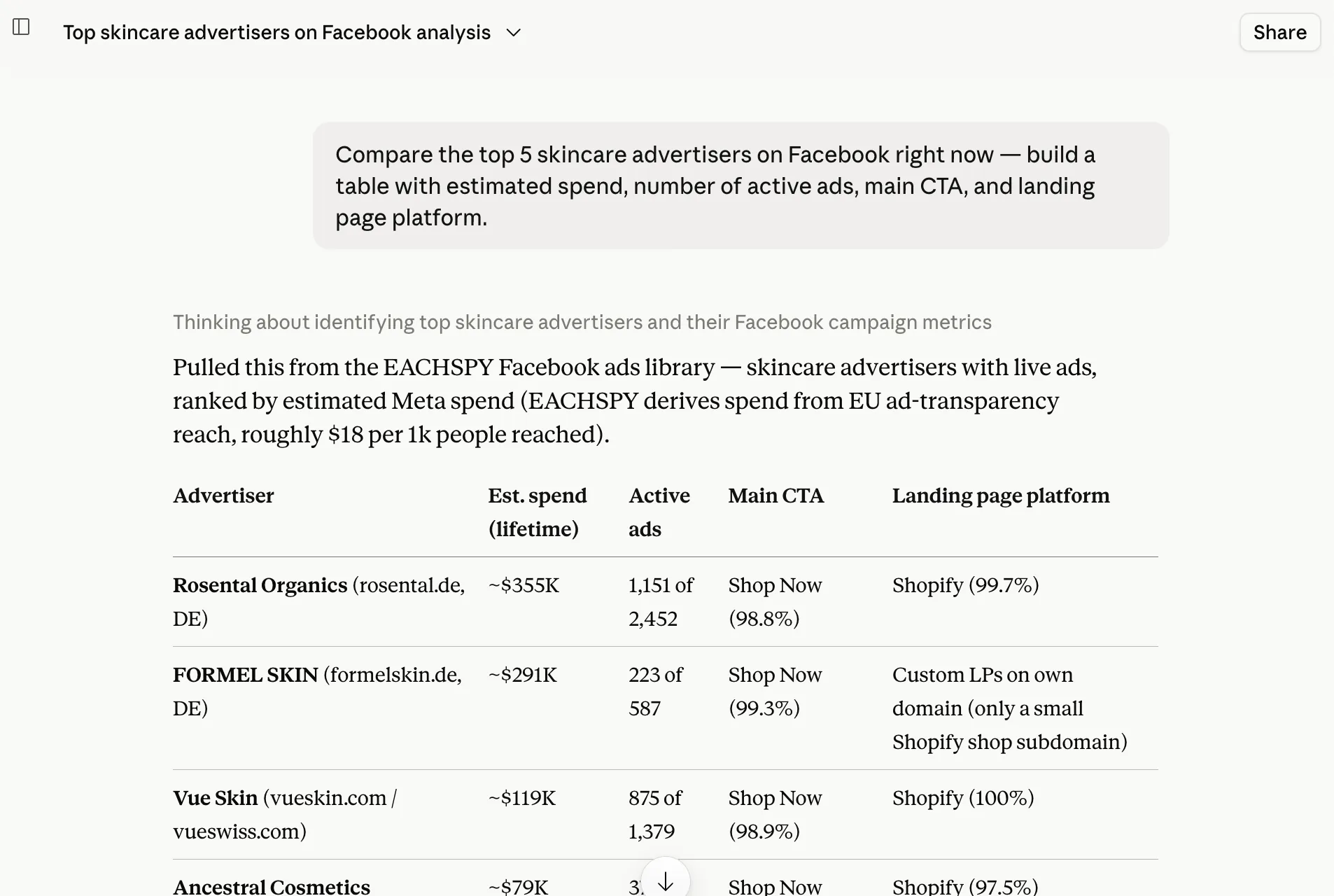
Add Eachspy to ChatGPT, Claude, or a coding agent like Codex. Ask a question or hand over a research task, and it searches Facebook ads and Shopify products for you and brings back spend estimates, landing pages, and the creatives.
Hand over a task, or ask a question
Connect your AI
Pick your tool and follow the steps. You sign in to Eachspy once and approve read-only access.
-
1
In ChatGPT, open Settings → Apps & Connectors → Advanced settings and turn on Developer mode.
-
2
Click Create, name it “Eachspy” and paste the connector URL:
https://www.eachspy.com/mcp -
3
Sign in to Eachspy and click Allow. Codex, signed in with the same ChatGPT account, can use it too.
-
1
In Claude, open Settings → Connectors → Add custom connector (paid Claude plans).
-
2
Name it “Eachspy” and paste the connector URL:
https://www.eachspy.com/mcp -
3
Click Connect, sign in to Eachspy and click Allow.
-
1
Run in your terminal:
codex mcp add eachspy --url https://www.eachspy.com/mcpcodex mcp login eachspy
-
2
Your browser opens. Sign in to Eachspy and click Allow.
-
3
Start codex and ask. It calls Eachspy when it needs to.
-
1
Run in your terminal:
claude mcp add --transport http --scope user eachspy https://www.eachspy.com/mcpclaude mcp login eachspy
-
2
Your browser opens. Sign in to Eachspy and click Allow. Already inside Claude Code? Run /mcp, pick eachspy and choose Authenticate instead.
-
3
Start claude and ask. It calls Eachspy when it needs to.
-
1
Add Eachspy to ~/.cursor/mcp.json:
{ "mcpServers": { "eachspy": { "url": "https://www.eachspy.com/mcp" } }}
-
2
Cursor asks you to sign in to Eachspy. Click Allow.
-
3
Ask in Agent chat.
What your AI can do with Eachspy
Twelve read-only tools over 57M+ Facebook ads, 99M+ Shopify products, and 1.1M+ Shopify stores.
Search ads
Every dashboard filter: platform, country, CTA, format, estimated spend, affiliate network, and landing page.
search_ads
Trending products
Products whose Facebook ad count is growing fastest, from the daily momentum ranking.
get_trending_products
Ad details and copies
Creative, landing page, run time, and every other ad reusing the same creative.
get_adfind_similar_ads
Advertiser stats
Totals, estimated spend, top landing pages, and daily launches over time for any Facebook Page.
get_advertiser_statsget_advertiser_trendresolve_advertiser
Product search
Shopify products with price, store, dropshipping signals, and the ads pointing at them.
search_productsget_product
Store timelines
When a Shopify store started listing and how fast it adds products.
get_shop_timeline
The same libraries are searchable in the browser with Facebook ad spy and Shopify product research.
Example prompts
Copy a prompt into your AI tool. The answers include fields the public Ad Library doesn't show.
“Find winning Facebook ads from Shopify skincare stores running 60+ days, and show me the creative images.”
The ad images and video posters, with how long each ad has run.
“Which Shopify products are gaining Facebook ads fastest this week? Show the top 10 with store and price.”
Products ranked by daily ad growth, with the store, price, and the ads behind them.
“Which advertisers are spending the most on pet-product ads on Facebook right now?”
Advertisers ranked by spend estimated from EU transparency reach.
“Find Shopify dropshipping products under $50 that already have active Facebook ads.”
Products with running ads, their images, price, and dropshipping signals.
“Show me ClickBank affiliate ads that are scaling, with the offer domain.”
The network, offer domain, and tracking pixels, which the Ad Library doesn't show.
“Go through the 20 fastest-growing Shopify products, find each one's longest-running active ad, and save it all as a CSV.”
Codex or Claude Code runs the searches itself and hands back the file.
Questions about the Eachspy MCP
Which AI tools does this work with?
ChatGPT and Claude on plans that allow custom connectors, plus Codex CLI, Claude Code, and Cursor on your computer. If you connect Eachspy in ChatGPT, Codex signed in to the same account can use it too. Other clients that support remote MCP servers with OAuth work with the same URL.
Do I need a paid plan?
Yes. The AI Connector is part of the Eachspy Pro and Team plans. ChatGPT and Claude also need a plan that supports custom connectors; Codex CLI, Claude Code and Cursor use whatever plan you already run them on.
Can an agent run a big research task?
Yes. Agents chain dozens of searches in one task; in the run above, Codex made 52 Eachspy calls before answering. Pro and Team have no monthly search cap. A per-minute fair-use limit applies, and an agent that hits it is told how many seconds to wait.
What can the AI actually access?
Read-only search of the Eachspy Facebook ad and Shopify product libraries, the same data you see in the dashboard. It can't change, share or delete anything, and it has no access to your ad accounts or billing.
How fresh is the data?
It's the same database as the dashboard. New Facebook ads arrive every hour and product listings are refreshed daily.
Does it show the ad and product images?
In ChatGPT and Claude, yes: results carry creative image URLs and video posters, and the AI renders them inline. Terminal agents get the same links, plus Ad Library and Eachspy links for every ad.
Is it safe? Can I disconnect later?
The connection uses OAuth with a read-only scope and can be revoked anytime from your AI tool. Each account keeps one connection per platform (ChatGPT, Claude, and one local app such as Codex CLI, Claude Code or Cursor), so a new authorization replaces the old one on that platform.
Keep exploring
Use Eachspy from your AI tools
The AI Connector is included with Pro and Team. Connect ChatGPT, Claude, and a local agent on one account.