Eachspy MCP
Spy on Facebook ads from your AI chat
Connect Eachspy to ChatGPT, Claude, or any MCP-ready assistant. Ask in plain language and get enriched Facebook ads and Shopify products back — estimated spend, affiliate networks, landing platforms and the creatives themselves. Read-only, no exports, no copy-paste.
Connect in 3 steps
-
1
Open your AI's connector settings
In Claude: Settings → Connectors → Add custom connector (needs a paid Claude plan). In ChatGPT: turn on Developer mode first.
-
2
Add the Eachspy connector
Name it “Eachspy” and paste your connector URL:
https://www.eachspy.com/mcp -
3
Sign in and start asking
Authorize read-only access, then ask away — like “Find winning Shopify skincare ads.”
Needs an Eachspy Pro plan and an AI plan that supports custom connectors.
See it in action
One question. A full answer.
No dashboards, no filters — just the enriched intelligence, written back to you.
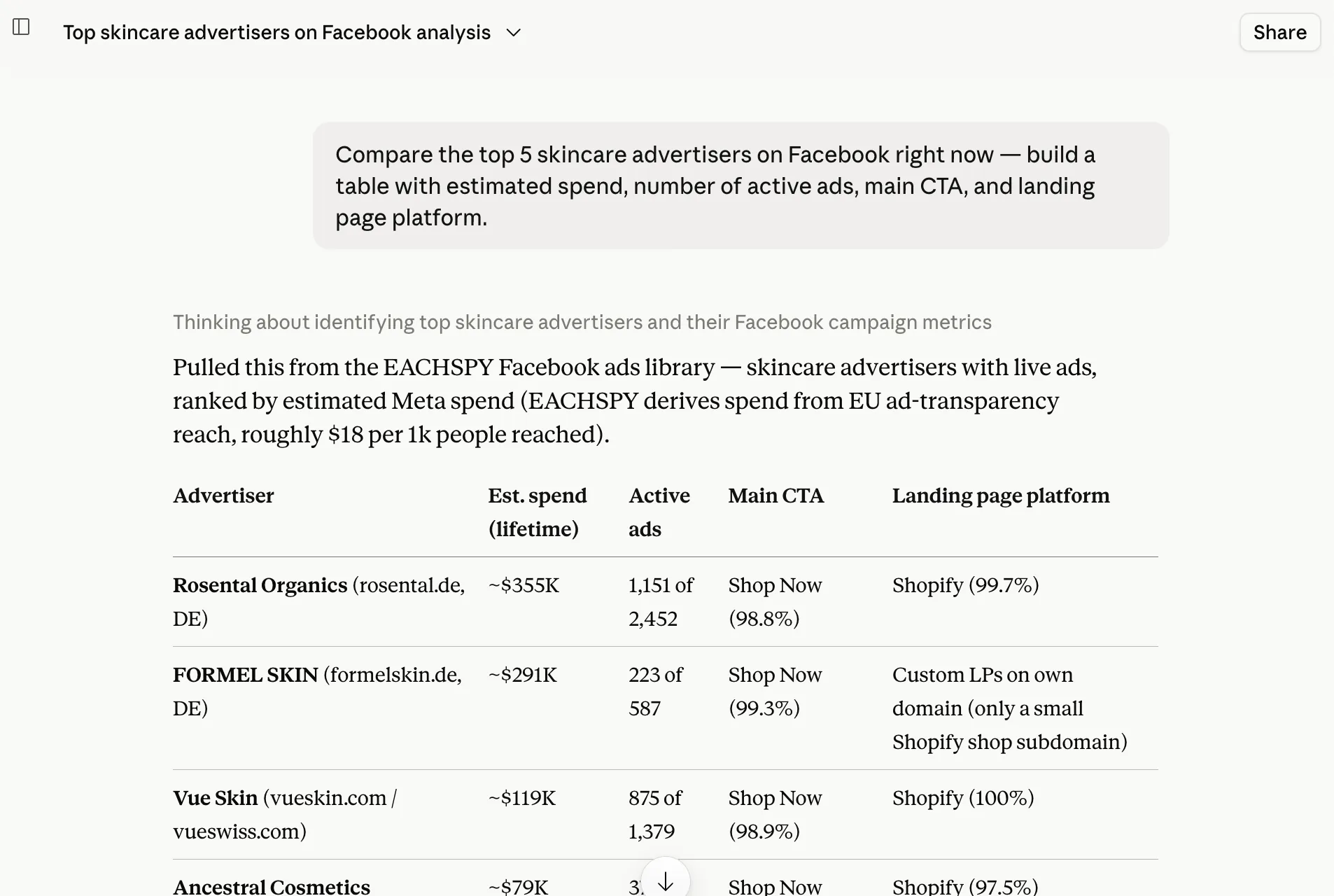
A real, unedited answer — nothing pasted in by hand.
65M+
Facebook ads
103M+
Shopify products
1.2M+
cửa hàng Shopify
What you can ask
Skip the filters. Just ask.
Copy any prompt into your AI. Each comes back with the enriched fields the public ad library can't give you.
“Find winning Facebook ads from Shopify skincare stores running 60+ days, and show me the creative images.”
Live creatives and video posters, with how long each ad has run.
“Which advertisers are spending the most on pet-product ads on Facebook right now?”
Advertisers ranked by estimated spend, derived from EU ad-transparency reach.
“Show me ClickBank affiliate ads that are scaling, with the offer domain.”
Affiliate network, offer domain and tracking pixels the public library never shows.
“Find Shopify dropshipping products under $50 that already have active Facebook ads.”
Products matched to live ads, with images, price and dropshipping signals.
Copy a prompt, paste it into your AI with Eachspy connected.
Questions about the Eachspy MCP
How the connector works, what it can see, and how to stay in control.
Any assistant that supports MCP custom connectors. Claude is the smoothest — claude.ai and the desktop app support them on paid plans (Pro, Max, Team, Enterprise). ChatGPT works too once you enable Developer mode and add a custom MCP with the same URL; it is a little more advanced to set up.
Yes — an Eachspy Pro or Team subscription unlocks MCP access, and your AI needs a plan that supports custom connectors. Both sides need to be paid.
Read-only search of the Eachspy Facebook ad and Shopify product libraries — the same data you see in the dashboard. It can never change, share or delete anything, and it has no access to your ad accounts or billing.
It is the live Eachspy database. New Facebook ads are added continuously and product listings are refreshed daily, so answers come from the same up-to-date index as the dashboard.
Yes. Results carry creative image URLs and video posters, and your AI renders them inline so you see the actual ads and products in the chat — not just text.
The connection uses OAuth with a read-only scope and can be revoked anytime from your AI assistant. Each platform keeps a single active connection, so a new authorization replaces the old one and shared or stale sessions are cut off.
Prefer the dashboard?
Xem tất cả tính năngFacebook Ad Spy
Tìm kiếm hàng triệu quảng cáo Facebook & Instagram từ các cửa hàng Shopify và thương mại điện tử. Khám phá sản phẩm bán chạy, theo dõi chi tiêu quảng cáo của đối thủ và phân tích landing page cùng mẫu quảng cáo.
Affiliate Ad Spy
Theo dõi quảng cáo affiliate trên Facebook và Instagram. Tìm kiếm theo ClickBank, Digistore24, tên miền offer hoặc pixel ID — xem affiliate ID, landing page và chi tiêu ước tính.
Nghiên cứu sản phẩm Shopify
Tìm kiếm hàng triệu sản phẩm Shopify theo từ khóa, giá và hoạt động quảng cáo. Tìm sản phẩm dropshipping tiềm năng, theo dõi cửa hàng đối thủ và phát hiện ngách đang tăng trưởng.
Công cụ theo dõi nhà quảng cáo
Theo dõi bất kỳ nhà quảng cáo Facebook nào và giám sát quảng cáo của họ theo thời gian. Xem tổng số quảng cáo, chiến dịch đang chạy, quảng cáo mới, landing page và chi tiêu ước tính.
Công cụ theo dõi cửa hàng Shopify
Theo dõi cửa hàng Shopify và từ khóa sản phẩm của đối thủ với cảnh báo email hằng ngày. Xem sản phẩm mới, kết quả khớp từ khóa và quảng cáo liên quan từ các cửa hàng bạn theo dõi.
Bring Eachspy into your chats
Pro and Team subscribers can connect their AI today and research ads in plain language.